



App Pins
Category: Software
$4.95
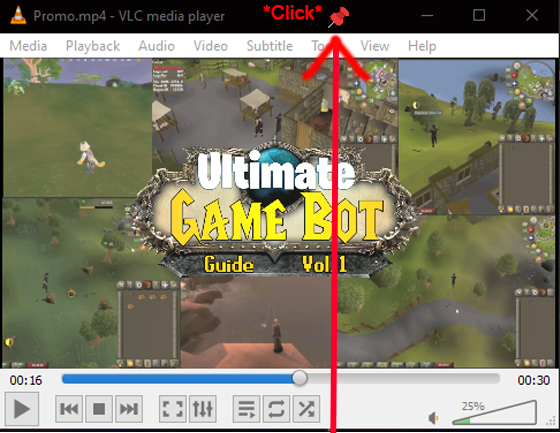
Take control of your desktop workspace with App Pins, a lightweight utility that lets you pin any application window to stay always on top. No more juggling windows or losing track of important tools.
- Digital Download
- Lifetime Warranty
- Secure Payments
- 30-Day Money-Back Guarantee
Take control of your desktop workspace with App Pins, a lightweight utility that lets you pin any application window to stay always on top. No more juggling windows or losing track of important tools.
Key Features
- One-Click App Pinning: Left-click the tray icon to enter pinning mode, then click any window to make it always on top. Click it again to unpin.
- Visual Feedback: Custom cursor changes to indicate pinning mode is active, so you always know when you are in pinning mode.
- Unpin All: Clear all pinned windows instantly with a single menu command.
- System Tray Integration: Runs quietly in the system tray with a convenient right-click menu for all actions.
- Minimal Resource Footprint: Designed to be lightweight and unobtrusive, running seamlessly in the background.
How It Works
- Launch App Pins. It runs quietly in your system tray.
- Left-click the tray icon to activate pinning mode (cursor changes to a pushpin).
- Click any application window to pin it. It will stay on top of all other windows.
- Click the same window again to unpin it.
- Use “Unpin All” from the tray menu to clear all pinned windows at once.
Why Buy From Us?
- Instant Access, No Waiting: Get the download link immediately after payment. No shipping delays or lost mail.
- Professionally Prepared: Thoroughly tested for stability on Windows 11, 10, 8, and 7.
- Fully Portable: Runs directly from the folder. No installation or registry changes needed.
- Dedicated Support: Contact us with any questions during download or setup.
Digital Delivery Process
- Complete Checkout: Purchase securely.
- Instant Access: Receive your download link and license key immediately after payment confirmation.
- Download and Extract: Download the archive and extract it to any location on your computer.
- Activate: Use the included license key to activate the software. The link to manage your activated machines is included with your purchase.
- Run: Launch App Pins and start pinning windows.
Satisfaction Guarantee
If you encounter any issues with your download or the software does not work as expected, contact us and we will help resolve it.
Important Notes
- License Key Included: Your purchase includes a unique license key delivered via email. Use it to activate the software.
- Machine Management: You can manage which machines your license is associated with using the link provided in your email.
- Entirely Portable: No installation required. Runs directly from the extracted folder.
- Need Help?: Contact us with any questions.
Add a review
 App Pins
Your review
* Review is required
Name
* Name is required
Email
* Email is required
Reviews
There are no reviews yet